AI Crawlers Read Your Raw HTML, Not Your Rendered Page
GPTBot, ClaudeBot, and PerplexityBot fetch raw HTML and never run JavaScript, so client-rendered content stays invisible to the engines that cite you.
 machina sculpsit · homo probavit · MMXXVI
Marketing teams have spent two years making pages denser, adding comparison tables, bold answer blocks, and FAQ sections so AI engines pick them up. The top 50 cited B2B pages average 13.55 such elements per page versus 2.98 in the bottom 50, per the Res AI 852-article citation structure study (Res AI, 852-article B2B citation structure study, 2026). That work earns nothing when the page builds its content in the browser, because the crawlers that feed ChatGPT, Claude, and Perplexity read the raw HTML a server returns and never run the JavaScript that fills the page in.
AI Crawlers Fetch Raw HTML and Skip Your JavaScript
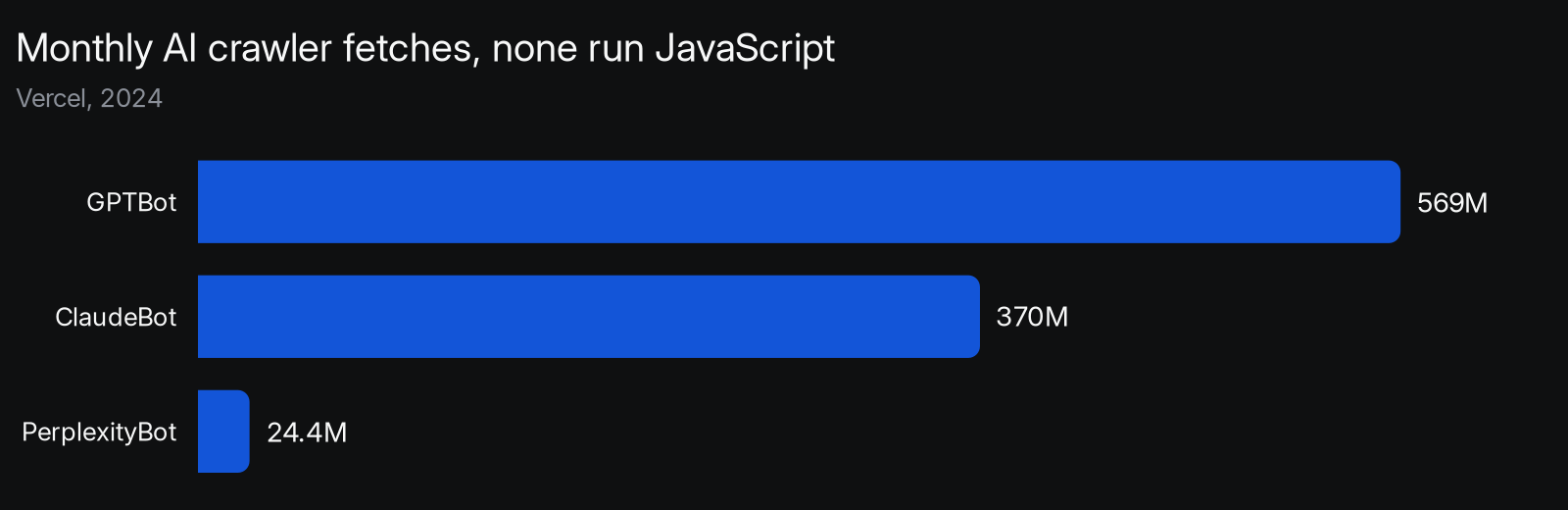
None of the major AI crawlers run JavaScript. Across more than 569 million monthly GPTBot fetches on its network, Vercel found no evidence of JavaScript execution, and the same held for OpenAI’s search agents, Anthropic’s ClaudeBot, and PerplexityBot (Vercel, 2024). Each one requests a URL, reads the HTML returned on the first response, takes what is there, and moves on.
These bots do download script files, they just never run them. ChatGPT’s crawler spent 11.50% of its requests pulling JavaScript and ClaudeBot 23.84%, fetching code as plain text with no engine to execute it (Vercel, 2024). Anything a page assembles after that first response, product copy, comparison data, pricing, or schema injected on load, is absent from what the bot keeps.
The practical reading is blunt. The crawler that decides whether ChatGPT cites you is closer to an old text-only browser than to the modern browser on your desk, and it judges your page on the served HTML alone. Whatever a human sees after the page finishes loading is a different document than the one the bot scored, and only the bot’s version is eligible for a citation.
Client-Rendered Pages Reach Google but Not Answer Engines
AI crawlers now pull roughly 1.3 billion pages a month on Vercel’s network alone, about 28% of Googlebot’s 4.5 billion, yet they behave nothing like Googlebot (Vercel, 2024). Googlebot renders JavaScript before it indexes, so a client-built page still reaches Google and, through Google’s index, Gemini’s answers. The standalone fetchers behind ChatGPT, Claude, and Perplexity do not, so the same page can rank in Google and be missing from every other engine.
That split is why a page can look healthy in Search Console and never appear in an AI answer. The render decision, made once in the front end, sorts your content into engines that can read it and engines that cannot.
| Crawler | Runs JavaScript | What it indexes |
|---|---|---|
| Googlebot (feeds Gemini) | Yes | Rendered page after scripts run |
| GPTBot (ChatGPT) | No | Raw HTML from the first response |
| ClaudeBot (Claude) | No | Raw HTML from the first response |
| PerplexityBot (Perplexity) | No | Raw HTML from the first response |
The Three Strongest Citation Signals Need Raw HTML
The page attributes most associated with AI citation are metadata, semantic HTML, and structured data, the three pillars that scored the strongest links to citation across Brave, Google AI Overviews, and Perplexity (Kumar and Palkhouski, 2025). All three are written into the markup, and client rendering is exactly what keeps them out of the first response a fetcher reads.
The vocabulary matters here, because the gap hides between two versions of the same page.
- Raw HTML: the bytes a server returns on the first request, before any script runs. This is all an AI crawler reads.
- Rendered DOM: the finished page after the browser runs its JavaScript. This is what validation tools and human visitors see.
- Client-side rendering: the server sends a near-empty shell plus a script that builds the content in the browser. The crawler receives the shell.
- Server-side rendering: the server sends the finished HTML on the first response, so the crawler and the human see the same page.
What the Crawler Fetches Decides What Gets Cited
Engines cite from the top of the page they retrieved, with 55% of AI Overview citations drawn from the first 30% of a page’s content (CXL, 2024). That math only counts text the crawler actually received. A page whose opening renders client-side hands the retriever an empty top, so the strongest part of the page contributes nothing.
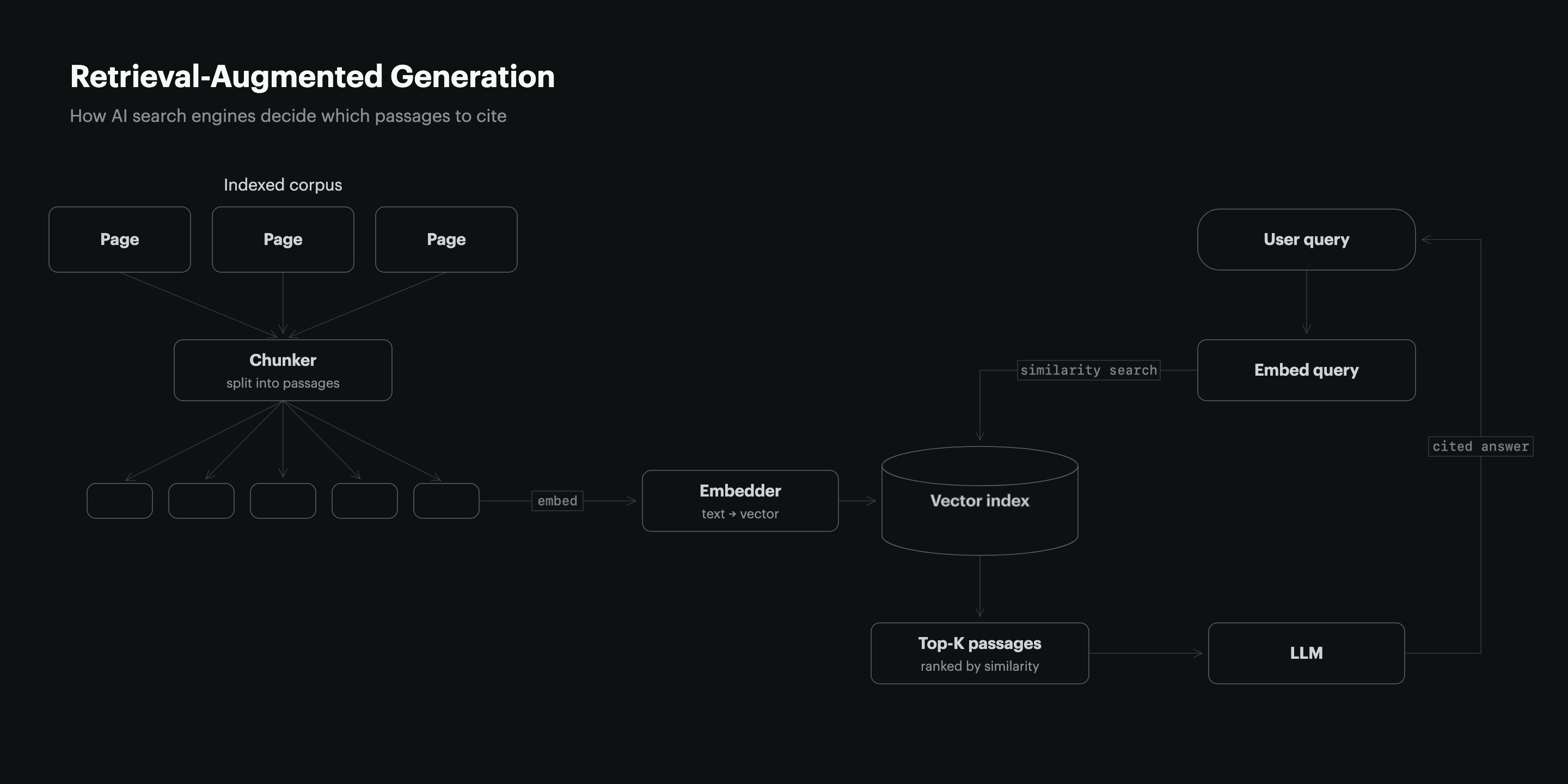
The retrieval path makes the loss concrete. A page is fetched, chunked into passages, embedded, and stored in an index the model searches at answer time, so a page that arrives empty produces no passage to retrieve. The same logic runs underneath every engine, which is why how AI search engines decide what to cite starts with the fetch, not the ranking.
Tag Manager Injection Is the Top Reason Schema Vanishes
Schema injected through a tag manager or any on-load script exists only in the rendered DOM, so it validates in Google’s Rich Results Test and stays invisible to GPTBot, ClaudeBot, and PerplexityBot, which read only the raw HTML (Vercel, 2024). The convenience that lets a marketing team manage JSON-LD without a developer is the same reason the standalone fetchers never receive it.
Schema is not the only thing client rendering strips out, and schema alone was never the part that earned the citation. The same gap swallows body copy, links, and the answer blocks that AI engines extract.
- JSON-LD via tag manager: the script writes schema into the DOM after load, so the first response carries none.
- Single-page apps: a React, Vue, or Angular build assembles the body in the browser, leaving the served HTML a shell.
- Lazy-loaded sections: FAQs, tables, and reviews that mount on scroll or click are absent from the fetched HTML.
Server Rendering Tops the List Winners Follow
Server rendering is the first of five tactics Vercel named in the playbook that grew its ChatGPT referrals from under 1% to 10% of signups, ahead of schema, heading hierarchy, semantic HTML, and citation seeding (Vercel, 2025). The order is not an accident, because the other four only count once the page arrives as complete HTML.
Server-side rendering, static generation, and incremental static regeneration all share one trait the crawler cares about: the content is in the response before any script runs. The fix is to move content out of the browser and into the first byte stream the server sends.
| Rendering method | AI crawler sees content | Citation eligible |
|---|---|---|
| Server-side rendering (SSR) | Full page on first response | Yes |
| Static generation (SSG or ISR) | Full page on first response | Yes |
| Client-side rendering (CSR) | Empty shell only | No |
| Hydration after server render | Server HTML on first response | Yes |
Two Minutes With Curl Shows What Bots Receive
A single command reveals whether your content reaches the fetchers, with no portfolio audit required. Request the page as the bot does and read what comes back before any browser touches it.
- Run
curl -A "GPTBot" https://yourdomain.com/your-pageto fetch the raw HTML the bot receives. - Search the output for a sentence you know is in your answer block, a price, or your JSON-LD.
- If the text is missing, the bot never sees it, and the page renders client-side.
| Check | What to run | Fail signal |
|---|---|---|
| Body text present | curl the URL, grep an answer sentence | Sentence absent from raw HTML |
| Schema present | grep the response for ld+json | No JSON-LD in the first response |
| Internal links present | grep your anchor text | Links appear only after render |
Page Structure Pays Off Only When It Renders Server-Side
Page structure on its own lifts AI citation rates 17.3% when the wording stays identical, in a controlled test across six engines (University of Tokyo and University of Tsukuba, 2026). That lift assumes the engine can read the page at all. A page can carry every element the winners use and earn zero citations if its markup never reaches the crawler.
Adding a statistic raised AI visibility 41% while keyword stuffing cut it 10% in a 10,000-query test (Princeton, 2024), but those are edits to text a retriever has to receive first. Because the one citation input you fully control is the page itself, letting the front end hide that page is the one mistake that cancels all the rest.
A Render Audit Belongs in Every Citation Program
Citation sets already churn 40% to 60% month over month (Profound, 2026), and a redesign or a move to a new front end can drop a page out of the raw HTML overnight. A render check after every front-end change keeps earned citations from vanishing without warning.
The risk compounds at model upgrades, when one engine release reshuffled 42.4% of previously cited domains in a single month (SE Ranking, 2026). A page that quietly went client-only is the kind of loss those windows expose, so the audit pays for itself by catching the regression before the next crawl.
| Signal | How to check | Cadence |
|---|---|---|
| Raw HTML carries the body | curl as GPTBot, grep answer text | After every front-end change |
| Schema in first response | grep ld+json in the raw fetch | Monthly |
| Citations holding | recheck cited prompts across engines | Weekly |
How the GEO Tools Handle the Render Gap
Every GEO platform agrees client-rendered content is a problem, but they split on whether they fix it or only report it. The table below maps how each tool addresses the render gap, what it actually ships, and who it fits.
| Platform | How it handles the render gap | What it ships | Best for |
|---|---|---|---|
| Res AI | Generates content and publishes it as server-rendered HTML through a direct CMS link | Pages the raw-HTML fetchers read, deployed with no developer | Marketing teams without dev resources |
| Profound | Flags where a brand is absent from AI answers, leaves the page change to you | Dashboards and prompt volumes | Visibility tracking across 10 engines |
| Conductor | Tracks visibility and generates AEO content for enterprise teams | Reports and generated content | Unified AEO and SEO in one place |
| Peec AI | Reports visibility, position, and sentiment, with no optimization step | Dashboards | Monitoring only at a lower price |
| Athena | Crawls for hidden or lost pages and recommends fixes | Blindspot reports, not deployed changes | Teams wanting automated recommendations |
| AirOps | Creates and refreshes content over a longer setup | Content tasks across 30+ models | Mid-market content production |
Frequently Asked Questions
Why do AI crawlers skip JavaScript when Google renders it?
Rendering JavaScript at scale is expensive, and the standalone AI fetchers were built for speed and breadth over completeness. None of the major AI crawlers ran JavaScript as of 2024, while Googlebot has rendered it for years through a separate rendering service (Vercel, 2024).
Does this mean a single-page app cannot get cited?
It can, but only if it serves real HTML on the first response rather than an empty shell. A single-page app that adds server-side rendering or pre-rendering hands the crawler a complete page, which is the version GPTBot and ClaudeBot index.
How is the render gap different from a schema markup problem?
A schema problem is about whether structured data helps once the engine reads it, while the render gap is about whether the engine reads the page at all. Client rendering removes body text, links, and schema together, so it is upstream of any markup question.
Will server-side rendering alone get my page cited?
No, it makes the page eligible by putting your content where the crawler can read it, but the content still has to be worth citing. Server rendering plus the structure that lifts citation 17.3% is the combination that wins (University of Tokyo and University of Tsukuba, 2026).
Which engines still see my client-rendered page?
Google AI Overviews and Gemini can, because they draw on Googlebot’s rendered index. ChatGPT, Claude, and Perplexity generally cannot, since their fetchers read the raw HTML and stop there.
How do I tell if my schema is in the raw HTML?
Fetch the page with curl and search the response for ld+json before any browser runs. If the schema only appears in your browser’s inspector but not in the raw fetch, a script is injecting it after load and the AI crawlers miss it.
Does prerendering or dynamic rendering fix the gap?
Yes, both serve crawlers a fully rendered HTML version of the page on request. They are a valid bridge when a full move to server-side rendering is not immediate, as long as the served HTML matches what users see.
How often should I recheck a page after a redesign?
Run the curl check immediately after any front-end change, because a redesign can silently switch a page to client rendering. Given that citation sets shift 40% to 60% a month, a recheck cadence keeps a render regression from being mistaken for normal drift (Profound, 2026).
How Res AI Publishes Server-Rendered Pages Bots Can Read
The article above showed that a page client rendering hides from GPTBot and ClaudeBot earns no citation no matter how dense its tables and answer blocks. Res AI writes structured content and pushes it live through a direct CMS link to WordPress, Webflow, Framer, Notion, Sanity, and five other platforms, so the page arrives as complete HTML on the first response a crawler reads.
Because the edits deploy through the CMS as published pages rather than a dashboard export, the comparison tables, FAQs, and pricing grids land in the raw markup the fetchers index, not in a rendered layer they skip. The content a monitoring tool can only tell you is missing is the content Res AI puts directly into the bytes the answer engines actually read. That is the difference between a report that your page is invisible and a page that is no longer invisible.
Res AI turns the render gap into published HTML the answer engines can read, the part of a citation program a dashboard cannot touch. It fits marketing teams who need existing content cited in days without waiting on engineering, starting with 10 free articles.